Church event request form
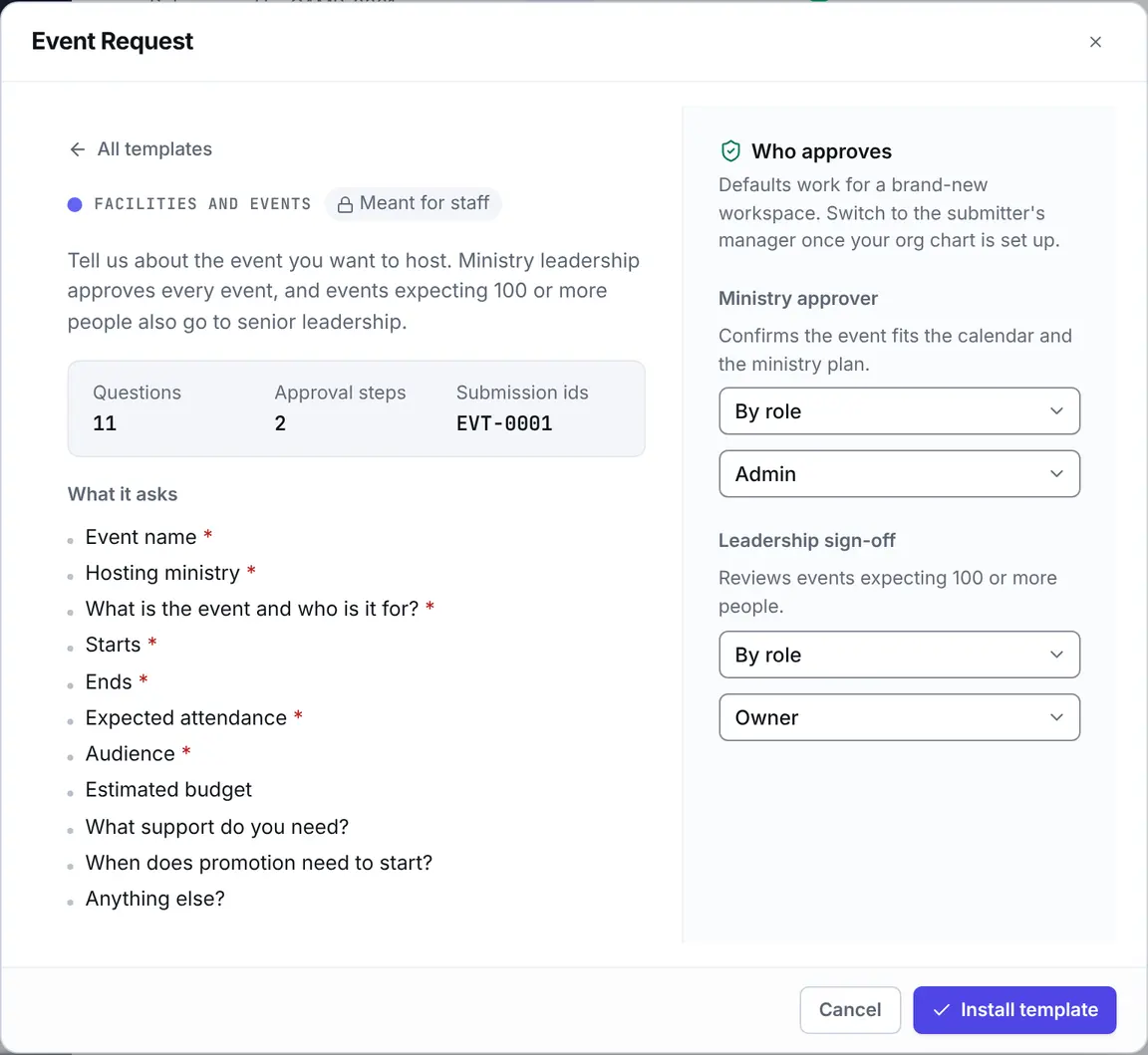
Eklo’s Event Request template is a church event request form for ministries that want to put something on the calendar. It asks what the event is, who it’s for, the budget and the support it needs, and routes it to ministry leadership. Big events go to senior leadership too.
- 11 questions
- 2 approval steps
- Meant for staff
- References like EVT-0001
The approval path
Steps run in order, and a decline ends the request, so later steps don’t run. When you install the template, you choose who decides each one. Nobody can approve their own request: when nobody else can decide a step, your workspace owners and admins decide it.
Ministry approval
Ministry approver. Confirms the event fits the calendar and the ministry plan.
By default, anyone with the Admin role decides.
Every request.
Leadership sign-off (large event)
Leadership sign-off. Reviews events expecting 100 or more people.
By default, anyone with the Owner role decides.
Only when “Expected attendance” is 100 or more.
Who it suits
- Churches that want one front door for events instead of a ministry leader emailing five people.
- The executive pastor or event coordinator who needs to see the budget and the headcount before saying yes.
- Ministries that need childcare, catering, A/V, promotion or volunteers lined up for an event.
What the form asks
11 questions, 7 of them required. Add, remove or reword any of them in the form builder.
Event name
Short text · RequiredHosting ministry
Short text · RequiredWhat is the event and who is it for?
Long text · RequiredStarts
Date and time · RequiredEnds
Date and time · RequiredExpected attendance
Number · RequiredAudience
Choose one · RequiredOptions: Whole church, This ministry only, Community and guests.
Estimated budget
MoneyTotal expected spend, including food, supplies, and honorariums.
What support do you need?
Choose anyOptions: Room or space, Childcare, Catering, A/V, Graphics and promotion, Volunteers, Registration.
When does promotion need to start?
DateAsked only when “What support do you need?” includes Graphics and promotion.
Anything else?
Long text
Questions
Why do events of 100 or more need a second sign-off?
Big events affect the whole church: parking, childcare, the building and the budget. The template sends them to leadership after the ministry approves. You can change the number, or the step, in the form’s workflow.
Does an event request reserve a room?
No. The form asks whether the event needs a room, but it doesn’t book one. Pair it with the Facility Request template, or add a workflow step that creates a task for facilities once the event is approved.
Can communications see what promotion an event needs?
If the requester picks “Graphics and promotion”, the form asks when promotion needs to start. Add a workflow step that posts approved events in your communications channel and they’ll see it there.
Who can submit an event request?
Once you set it to Internal, everyone in your workspace can. It installs as a private draft that only you, its editors and your workspace admins can open until then.