Church purchase request form
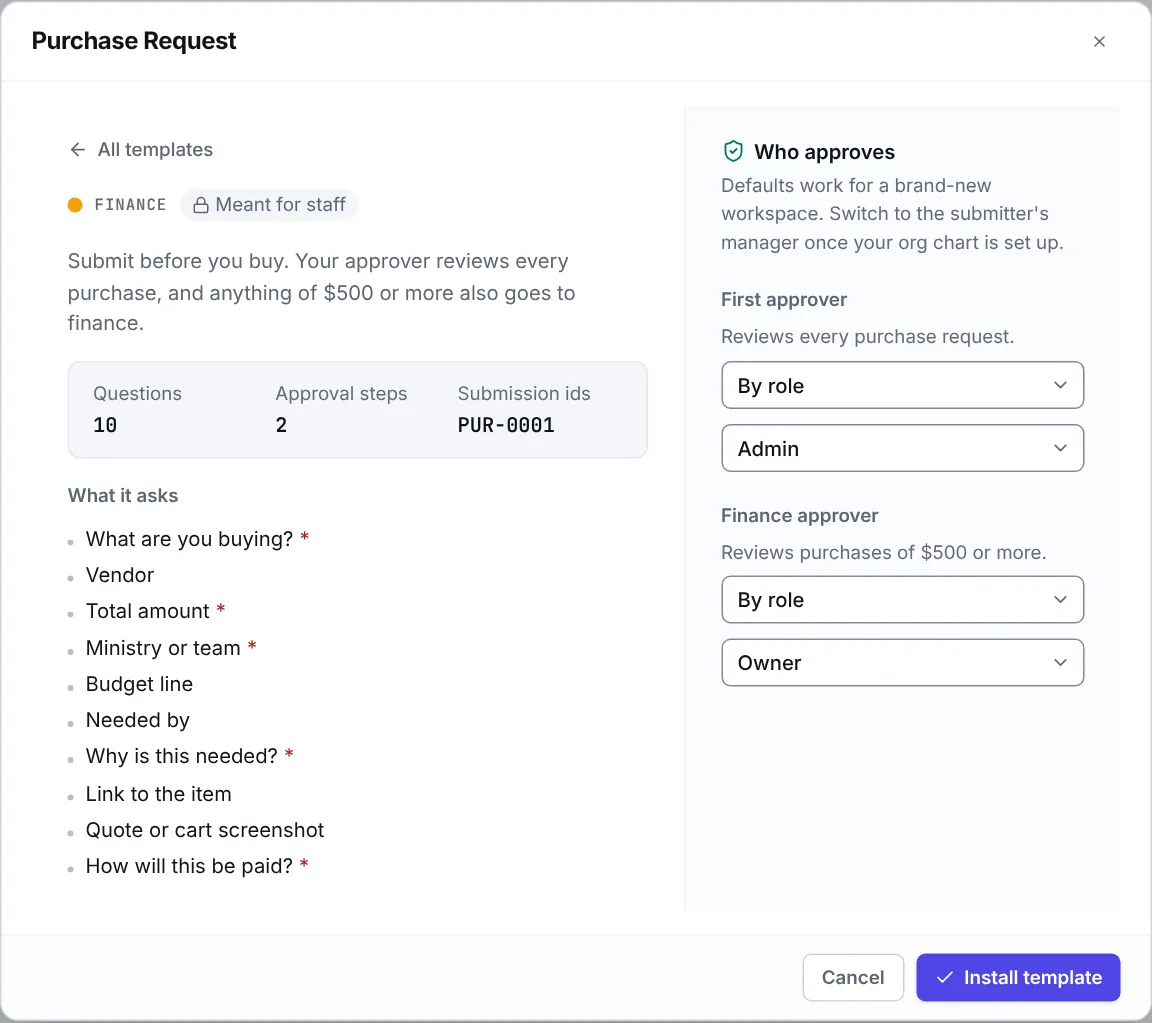
Eklo’s Purchase Request template is a church purchase approval form. Staff fill it in before they spend: what it is, the vendor, the total, the budget line and why it’s needed. A first approver reviews every purchase, and anything of $500 or more also goes to finance.
- 10 questions
- 2 approval steps
- Meant for staff
- References like PUR-0001
The approval path
Steps run in order, and a decline ends the request, so later steps don’t run. When you install the template, you choose who decides each one. Nobody can approve their own request: when nobody else can decide a step, your workspace owners and admins decide it.
Manager approval
First approver. Reviews every purchase request.
By default, anyone with the Admin role decides.
Every request.
Finance approval ($500 or more)
Finance approver. Reviews purchases of $500 or more.
By default, anyone with the Owner role decides.
Only when “Total amount” is $500 or more.
Who it suits
- Churches that find out about spending when the card statement arrives.
- Finance staff and business administrators who want a reason and a budget line on every purchase.
- Ministry leaders who buy equipment and supplies and want a quick yes before they order.
What the form asks
10 questions, 5 of them required. Add, remove or reword any of them in the form builder.
What are you buying?
Short text · RequiredVendor
Short textTotal amount
Money · RequiredInclude tax and shipping.
Ministry or team
Short text · RequiredBudget line
Short textNeeded by
DateWhy is this needed?
Long text · RequiredLink to the item
LinkQuote or cart screenshot
File upload, up to 3How will this be paid?
Choose one · RequiredOptions: Church card, I will pay and request reimbursement, Vendor invoices the church, Purchase order.
Questions
Can I change the $500 limit?
Yes. The limit is a condition in the form’s workflow. Open the workflow, change the amount, and save. You can also add more conditions, like a third approver for large purchases.
What’s the difference between a purchase request and a check request?
A purchase request asks permission before money is spent. A check request asks finance to pay a bill that already exists, with the invoice attached.
Does Eklo pay the vendor?
No. Eklo records the request and who approved it. Payment happens the way it does today: the church card, a reimbursement, an invoice or a purchase order, which the form asks about.
Can I see every purchase request in one place?
Yes. The form’s editors see every submission on its page, with where each one stands. They can click Export CSV to download them as a spreadsheet, one column per question.